Ever wish you could make an ontology right from your spreadsheet? A lot of my ontology drafting work begins with a spreadsheet: a lexicon, a catalog of important concepts or subject-matter expert terms of art, data types, etc. Along the way, I usually either start from a template (I made) or I draft and then normalize the columns as I go.
I made some ontology development software that should help out with that. =) See my Tabular Ontology Maker (https://jonathanvajda.github.io/tabular-ontology-maker/).

Main features:
- Quick ontology drafting from scratch (starter data as a guide)
- User-friendly spreadsheet look-and-feel (add and remove rows, add or hide columns, copy-paste, etc.)
- Only local data — No data is saved on a server or even leaves the user’s computer (perfect for handling sensitive data)
- Import pre-existing from table (download a template)
- Easily assert OWL type (Class, ObjectProperty, NamedIndividual, etc.)
- Smart taxonomy lookup-and-build: x ‘is a‘ y
- ‘is a’ checks defined elements to build upon existing taxonomy (including pre-loaded ontologies like Basic Formal Ontology and Common Core Ontologies, and ones defined by the user locally)
- ‘is a’ handles proper typing (if x type owl:Class, then x owl:subClassOf y; if x type owl:ObjectProperty, then x owl:subPropertyOf y, etc.)
- ‘is a’ constrains selection to valid options (if x is an owl:Class, then it only recommends classes for y)
- Common annotations (rdfs:label, skos:definition, etc.) and add-your-own
- Preview code as you go
- Export/download OWL file like Turtle (TTL)
- Manage ontology settings (base IRI, name, description, IRI schema, etc.)
- Manage prefix declarations and CURIEs
- Manage import statements (including loading an ontology)
The Problem(s)
I like working in spreadsheets when I draft ontologies, but many tools aren’t conducive to that.
Now, there are great command-line tools like ROBOT (ROBOT is an OBO Tool) for taking a normalized tabular data (IRI, label, definition, subClassOf, etc.) and then generating an OWL2 file from it. It works fairly well to work in Excel, then save, and run ROBOT to make the ontology. I highly recommend ontology developers to be familiar with ROBOT for this reason. But ROBOT requires Java, and in some environments the Java dependencies cannot be met. There are also Python scripts one could use (as I have made my own), that leverage the well-known RDFLib to generate an OWL2 file from the spreadsheet. However, some environments do not permit RDFLib (a pure Python package for working with RDF), and even if they were to permit it there’s no standard script/strategy — everyone has their own, with their own idiosyncrasies. Both of these options, while great for data scientists and tech-oriented folks, might be difficult for many ontology developers from library sciences and philosophy, who might not be comfortable with running transformations from the command-line.
There are also fairly decent free GUI tools like Protégé (by Stanford) and web-based tools like it (web protege, Mobi, etc.). But with the former there’s the same issue with Java dependencies. And for many people, Protégé is too resource-heavy. This can be addressed, but it requires modifying command line arguments or batch files to allocate heap sizes properly (a bar for entry many non-technical folks cannot clear) lest things silently fail to load (I’m looking at you, SPARQL plugin). There are plugins (like Cellfie) that might help, and Protege has an object property matrix (this gets prett close to what I want!) but in the end they can be pretty cumbersome. There are, of course, many web-based sites that help you develop in a project suite (See AllegroGraph or the old bulwark TopBraid) or in a graph-oriented display (Gra.fo, Fandaws). But many of these don’t allow you to work with spreadsheets directly, or they have high cost licenses. Many of these may be fine for your workflows, but it is hard to recommend them for what I am trying to do.
But as for me, I want a spreadsheet-oriented view. Like Protégé’s, but streamlined and less-cluttered by side windows.
Solution
I made some Ontology Development Software: https://jonathanvajda.github.io/tabular-ontology-maker/
This is fairly easy for me to use, too. Beside all the features mentioned above, it might help to clarify a few aspects.
Import Tabular Data
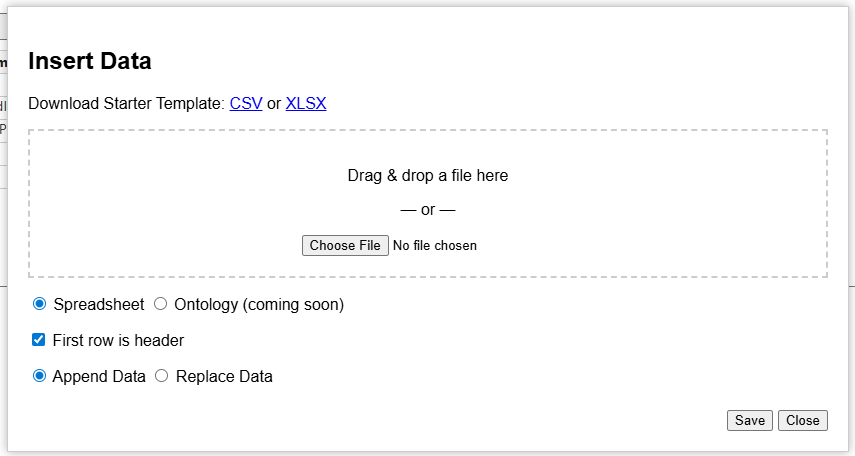
Add a spreadsheet (CSV or XLSX) easily by dragging and dropping or selecting from within a folder. You can wipe the current table and replace with the new, or you can just append it to the bottom (instead of overwriting).
Note: I recommend XLSX if you are loading more than just a bag of IRIs and labels, type statements and is-a statements, because commas in CSV can mess up the interpreter. This is especially important for definitions and citations.
(the ability to import ontology data is coming soon)
Ontology Settings

Here you can assert things like the label, creator, description, and the IRI schema. Prefer human-readable IRIs? It can generate them on the fly based on the label the ontologist gives. Prefer PascalCase, camelCase, or snake_case? Got you covered. Do you prefer opaque IRIs? Give some leading text, some digits, and some starting number, pretty similar to Protege’s capability. GUID-based IRI generator coming soon.
Generate IRIs with the “Backfill IRIs” button.
Manage IRI Prefixes

Easily add new prefixes for namespaces. Common namespaces are already included with their common prefixes.
Manage Predicates

I have 15 pre-defined commonly-used annotations in the drop down. These are used by Basic Formal Ontology, Common Core Ontologies, and Ontology of Biological and Biomedical Ontologies (OBO) Foundry. By extension, these would be helpful for folks in the Industrial Ontologies Foundry (IOF) and the emerging National Security Ontology (NSO) Foundry.
Of course, you can also add your own custom IRI. This is also where columns can be managed to show/hide.
Conclusion
I have found that this software has improved drafting ontologies while I’m working solo. One project, what would have taken me about an hour and a half, instead took me less than an hour. That’s pretty good. I think if I can get into habits using it, I would be even faster. I also think that while I’ve been using it, it has give me more ideas about what I want to do next to improve it.
I have heard some good feedback from other users, and I have added features people have requested. Some have been pretty excited. I’m always interested in more feedback, so if you are using it, let me know what you think!
 Jonathan M. Vajda
You must be logged in to post a comment.