I had the honor of sharing God’s word during Advent last Sunday (Dec 14, 2025) at my church, Christ Central Buffalo (CCB). As a ruling elder, I don’t have regular preaching responsibilities, but when it comes it is always such a blessing. I hope this word is encouraging to you. Sorry, I don’t have video for this recording
Photo Credit: Kevin Ng
Sermon text: Luke 2:26-45 (ESV)
(v26-33) In the sixth month the angel Gabriel was sent from God to a city of Galilee named Nazareth, to a virgin betrothed to a man whose name was Joseph, of the house of David. And the virgin’s name was Mary. And he came to her and said, “Greetings, O favored one, the Lord is with you!” But she was greatly troubled at the saying, and tried to discern what sort of greeting this might be. And the angel said to her, “Do not be afraid, Mary, for you have found favor with God. And behold, you will conceive in your womb and bear a son, and you shall call his name Jesus. He will be great and will be called the Son of the Most High. And the Lord God will give to him the throne of his father David, and he will reign over the house of Jacob forever, and of his kingdom there will be no end.”
(v34) And Mary said to the angel, “How will this be, since I am a virgin?”
(v35-38) And the angel answered her, “The Holy Spirit will come upon you, and the power of the Most High will overshadow you; therefore the child to be born will be called holy—the Son of God. And behold, your relative Elizabeth in her old age has also conceived a son, and this is the sixth month with her who was called barren. For nothing will be impossible with God.” And Mary said, “Behold, I am the servant of the Lord; let it be to me according to your word.” And the angel departed from her.
(v39-45) In those days Mary arose and went with haste into the hill country, to a town in Judah, and she entered the house of Zechariah and greeted Elizabeth. And when Elizabeth heard the greeting of Mary, the baby leaped in her womb. And Elizabeth was filled with the Holy Spirit, and she exclaimed with a loud cry, “Blessed are you among women, and blessed is the fruit of your womb! And why is this granted to me that the mother of my Lord should come to me? For behold, when the sound of your greeting came to my ears, the baby in my womb leaped for joy. And blessed is she who believed that there would be a fulfillment of what was spoken to her from the Lord.”
Ever wish you could make an ontology right from your spreadsheet? A lot of my ontology drafting work begins with a spreadsheet: a lexicon, a catalog of important concepts or subject-matter expert terms of art, data types, etc. Along the way, I usually either start from a template (I made) or I draft and then normalize the columns as I go.
Quick ontology drafting from scratch (starter data as a guide)
User-friendly spreadsheet look-and-feel (add and remove rows, add or hide columns, copy-paste, etc.)
Only local data — No data is saved on a server or even leaves the user’s computer (perfect for handling sensitive data)
Import pre-existing from table (download a template)
Easily assert OWL type (Class, ObjectProperty, NamedIndividual, etc.)
Smart taxonomy lookup-and-build: x ‘is a‘ y
‘is a’ checks defined elements to build upon existing taxonomy (including pre-loaded ontologies like Basic Formal Ontology and Common Core Ontologies, and ones defined by the user locally)
‘is a’ handles proper typing (if x type owl:Class, then x owl:subClassOf y; if x type owl:ObjectProperty, then x owl:subPropertyOf y, etc.)
‘is a’ constrains selection to valid options (if x is an owl:Class, then it only recommends classes for y)
Common annotations (rdfs:label, skos:definition, etc.) and add-your-own
Preview code as you go
Export/download OWL file like Turtle (TTL)
Manage ontology settings (base IRI, name, description, IRI schema, etc.)
Manage prefix declarations and CURIEs
Manage import statements (including loading an ontology)
The Problem(s)
I like working in spreadsheets when I draft ontologies, but many tools aren’t conducive to that.
Now, there are great command-line tools like ROBOT (ROBOT is an OBO Tool) for taking a normalized tabular data (IRI, label, definition, subClassOf, etc.) and then generating an OWL2 file from it. It works fairly well to work in Excel, then save, and run ROBOT to make the ontology. I highly recommend ontology developers to be familiar with ROBOT for this reason. But ROBOT requires Java, and in some environments the Java dependencies cannot be met. There are also Python scripts one could use (as I have made my own), that leverage the well-known RDFLib to generate an OWL2 file from the spreadsheet. However, some environments do not permit RDFLib (a pure Python package for working with RDF), and even if they were to permit it there’s no standard script/strategy — everyone has their own, with their own idiosyncrasies. Both of these options, while great for data scientists and tech-oriented folks, might be difficult for many ontology developers from library sciences and philosophy, who might not be comfortable with running transformations from the command-line.
There are also fairly decent free GUI tools like Protégé (by Stanford) and web-based tools like it (web protege, Mobi, etc.). But with the former there’s the same issue with Java dependencies. And for many people, Protégé is too resource-heavy. This can be addressed, but it requires modifying command line arguments or batch files to allocate heap sizes properly (a bar for entry many non-technical folks cannot clear) lest things silently fail to load (I’m looking at you, SPARQL plugin). There are plugins (like Cellfie) that might help, and Protege has an object property matrix (this gets prett close to what I want!) but in the end they can be pretty cumbersome. There are, of course, many web-based sites that help you develop in a project suite (See AllegroGraph or the old bulwark TopBraid) or in a graph-oriented display (Gra.fo, Fandaws). But many of these don’t allow you to work with spreadsheets directly, or they have high cost licenses. Many of these may be fine for your workflows, but it is hard to recommend them for what I am trying to do.
But as for me, I want a spreadsheet-oriented view. Like Protégé’s, but streamlined and less-cluttered by side windows.
This is fairly easy for me to use, too. Beside all the features mentioned above, it might help to clarify a few aspects.
Import Tabular Data
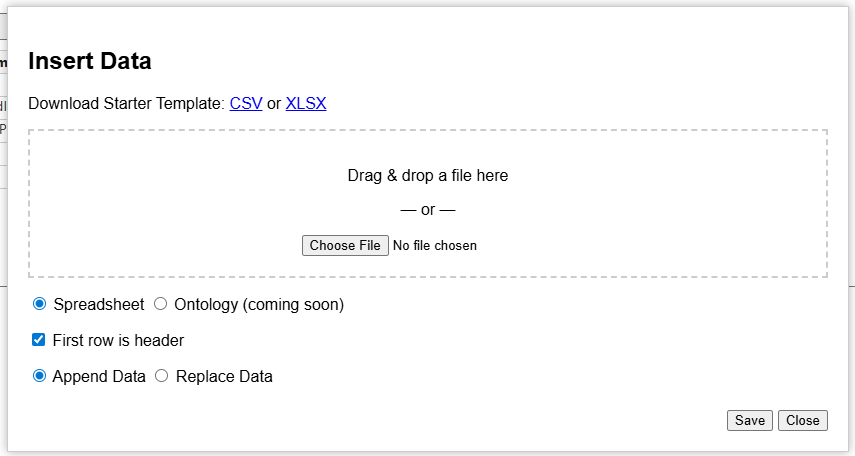
Add a spreadsheet (CSV or XLSX) easily by dragging and dropping or selecting from within a folder. You can wipe the current table and replace with the new, or you can just append it to the bottom (instead of overwriting).
Note: I recommend XLSX if you are loading more than just a bag of IRIs and labels, type statements and is-a statements, because commas in CSV can mess up the interpreter. This is especially important for definitions and citations.
(the ability to import ontology data is coming soon)
Ontology Settings
Here you can assert things like the label, creator, description, and the IRI schema. Prefer human-readable IRIs? It can generate them on the fly based on the label the ontologist gives. Prefer PascalCase, camelCase, or snake_case? Got you covered. Do you prefer opaque IRIs? Give some leading text, some digits, and some starting number, pretty similar to Protege’s capability. GUID-based IRI generator coming soon.
Generate IRIs with the “Backfill IRIs” button.
Manage IRI Prefixes
Easily add new prefixes for namespaces. Common namespaces are already included with their common prefixes.
Manage Predicates
I have 15 pre-defined commonly-used annotations in the drop down. These are used by Basic Formal Ontology, Common Core Ontologies, and Ontology of Biological and Biomedical Ontologies (OBO) Foundry. By extension, these would be helpful for folks in the Industrial Ontologies Foundry (IOF) and the emerging National Security Ontology (NSO) Foundry.
Of course, you can also add your own custom IRI. This is also where columns can be managed to show/hide.
Conclusion
I have found that this software has improved drafting ontologies while I’m working solo. One project, what would have taken me about an hour and a half, instead took me less than an hour. That’s pretty good. I think if I can get into habits using it, I would be even faster. I also think that while I’ve been using it, it has give me more ideas about what I want to do next to improve it.
I have heard some good feedback from other users, and I have added features people have requested. Some have been pretty excited. I’m always interested in more feedback, so if you are using it, let me know what you think!
[1-2] Simeon Peter, a servant and apostle of Jesus Christ, To those who have obtained a faith of equal standing with ours by the righteousness of our God and Savior Jesus Christ: May grace and peace be multiplied to you in the knowledge of God and of Jesus our Lord.
[3-11] His divine power has granted to us all things that pertain to life and godliness, through the knowledge of him who called us to his own glory and excellence, by which he has granted to us his precious and very great promises, so that through them you may become partakers of the divine nature, having escaped from the corruption that is in the world because of sinful desire. For this very reason, make every effort to supplement your faith with virtue, and virtue with knowledge, and knowledge with self-control, and self-control with steadfastness, and steadfastness with godliness, and godliness with brotherly affection, and brotherly affection with love. For if these qualities are yours and are increasing, they keep you from being ineffective or unfruitful in the knowledge of our Lord Jesus Christ. For whoever lacks these qualities is so nearsighted that he is blind, having forgotten that he was cleansed from his former sins. Therefore, brothers, be all the more diligent to confirm your calling and election, for if you practice these qualities you will never fall. For in this way there will be richly provided for you an entrance into the eternal kingdom of our Lord and Savior Jesus Christ.
[12-15] Therefore I intend always to remind you of these qualities, though you know them and are established in the truth that you have. I think it right, as long as I am in this body, to stir you up by way of reminder, since I know that the putting off of my body will be soon, as our Lord Jesus Christ made clear to me. And I will make every effort so that after my departure you may be able at any time to recall these things.
EUPHRANOR-You seem, Alciphron, to think obscurity a defect; but if it should prove to be no defect, there would then be no force in this objection. ALICIPHRON- I grant there would not.
EUPH.- Pray tell me, are not speech and stile instrumental to convey thoughts and notions, to beget knowledge, opinion, and assent? ALC.-This is true.
EUPH.-And is not the perfection of an instrument to be measured by the use to which it is subservient ? ALC.- It is.
EUPH.-What, therefore, is a defect in one instrument, may be none in another. For instance, edged tools are in general designed to cut; but the uses of an axe and a razor being different, it is no defect in an axe, that it hath not the keen edge of a razor: Nor in the razor, that it hath not the weight or strength of an axe. ALC.-I acknowledge this to be true.
EUPH.-And may we not say in general, that every instrument is perfect which answers the purpose or intention of him who uses it? ALC.- We may.
EUPH- Hence it seems to follow, that no man’s speech is defective in point of clearness, though it should not be intelligible to all men, if it be sufficiently so to those, who he intended, should understand it: Or though it should not in all parts be equally clear, or convey a perfect knowledge, where he intended only an imperfect hint.
I made some brief tutorials on how to use Mission Insite’s site to use their analytic services. Mission Insite provides reports for regions of interest to help recognize ministry opportunities. This can be a powerful asset for ministry planning, as it can help identify the baseline along many different axes, as one attempts to better align efforts with community needs. These axes include population size, age, ethnic background, family makeup, occupation and educational attainment, perceived spiritual needs, perceived physical needs, and opinion surveys on religion, politics, social and moral issues.
For example, if a multi-ethnic church had a strong initiative for teaching English as a foreign language, they might want to consider planting a church that focuses on the community to which they are reaching. They could make that decision in light of just talking with the folks they are working with, but to make a multi-year informed decision, it can help to get data on the entire community and look at various trend analyses.
First tutorial: Creating a Mission Insite Account
Why get access to Mission Insite? Who should get access to Mission Insite? How do you create a Mission Insite account? In this video I explain the how and why for getting a Mission Insite account.
What are Mission Insite reports? How might you use the insights from one of these reports for ministry? In this video I explain the service that acstechnologies.com provides, called Mission Insite. It is available at https://www.missioninsite.com. I explain what an Executive Insite report generates, and give some examples how these graphics and data can help you better plan your ministry. I encourage you to have your report in front of you.
In treating of these things, the use of Language is apt to occasion some Obscurity and Confusion, and create in us wrong Ideas. For Language being accommodated to the common Notions and Prejudices of Men, it is scarce possible to deliver the naked and precise Truth, without great Circumlocution, Impropriety, and (to an unwary Reader) seeming Contradictions. I do therefore, once for all, desire whoever shall think it worth his while, to understand what I have written concerning Vision, that he’d not stick in this or that Phrase, or manner of Expression; but candidly collect my meaning from the whole Sum and Tenor of my Discourse; and laying aside the Words, as much as possible, consider the bare Notions themselves, and then judge whether they are agreeable to Truth and his own Experience, or no.
Without even discussing the topic of “these things”, I want to highlight a few claims he makes that are insightful.
Natural language works for people even if it is biased, it isn’t precise or doesn’t correspond to reality exactly
The specific words he’s using in a very precise, methodical way don’t have to match how normal people talk
What matters is whether what he means is conveyed and what he’s saying is true to life
This is a lesson for the use of natural language and canonical, unambiguous, and theory-laden terms. You need both natural and formal language, and they are not functionally equivalent.
[25-27] “Therefore I tell you, do not be anxious about your life, what you will eat or what you will drink, nor about your body, what you will put on. Is not life more than food, and the body more than clothing? Look at the birds of the air: they neither sow nor reap nor gather into barns, and yet your heavenly Father feeds them. Are you not of more value than they?And which of you by being anxious can add a single hour to his span of life?
[28-30] And why are you anxious about clothing? Consider the lilies of the field, how they grow: they neither toil nor spin, yet I tell you, even Solomon in all his glory was not arrayed like one of these. But if God so clothes the grass of the field, which today is alive and tomorrow is thrown into the oven, will he not much more clothe you, O you of little faith?
[31-33] Therefore do not be anxious, saying, ‘What shall we eat?’ or ‘What shall we drink?’ or ‘What shall we wear?’ For the Gentiles seek after all these things, and your heavenly Father knows that you need them all. But seek first the kingdom of God and his righteousness, and all these things will be added to you.
[34] “Therefore do not be anxious about tomorrow, for tomorrow will be anxious for itself. Sufficient for the day is its own trouble.
If you’re like me, you have a laptop that for no known reason has the wifi turn off abruptly and won’t turn back on unless you reset it (fastest way was to just use the troubleshooter). It is a new laptop, so it shouldn’t be doing anything like this. Whatever.
I wanted to have a faster way to reset it than going into Windows troubleshooter or manually typing commands every time, so I created a batch file (.bat) that runs what the Windows troubleshooter does anyway. But it also looks like no one really posts this simple fix online, or Google’s search algo just steers users away from How-To’s on batch files unless it’s explicitly requested. So, I thought I’d just make it available, so you can create your own batch file. Maybe Google’s algo won’t direct anyone here. We’ll see. So, here’s the simple script:
echo on
netsh interface set interface Wi-Fi disable
netsh winsock reset
netsh interface set interface Wi-Fi enable
Explanation:
Line 1 basically tells the command prompt to display whatever command is called, for the user, so the user knows what is going on when.
Line 2 commands the network shell (netsh) to call upon a resource (interface) manipulate it (set), namely the wifi adapter (interface Wi-Fi) and change its value to OFF (disable). Your interface’s name might vary. Check by running ‘netsh interface show interface’ in a command prompt, and it’ll show you.
Line 3 commands the network shell to call upon Windows Sockets API (winsock) and manipulate it to a zero state (reset)
Line 4 commands the network shell to call upon a resource manipulate it, namely the wifi adapter and change its value to ON (enable)
If you got this far and you don’t know how to run it, see the warning below. But to cut to the chase: paste the code block in Notepad and save as a new file. Select “all file types” (rather than .txt files), and manually add “.bat” to the end of the file. This forces the file to be saved as a Batch File format (.bat), rather than the default for Notepad (.txt). Second, you need to run it in a Command Prompt. Third, this requires admin privileges. You can just save it on your desktop, right-click “Run as Administrator”, and you’re good.
Obligatory warning: if any of this seems totally foreign to you, google each of the things I mentioned. If any of this makes you uncomfortable, or if you have to be sneaky to get admin access, then just don’t do this. Ask someone you trust who is more competent to do it. You’d hate to turn off your wifi, not know how to turn it back on, only to not have internet access to google “how to fix the mess I’m in now”. Don’t cut off the branch you’re sitting on.
Maybe some other time I’ll post my script for resetting a printer spooler. I bet that’s online somewhere already, right?
P.S. I know I could just use Linux. That discussion is for another time. :þ
February 19, 2023 – Colonial Village Presbyterian Church (www.cvpchurch.org)
Sermon Text: Psalm 19
To the choirmaster. A Psalm of David. [v1-6] The heavens declare the glory of God, and the sky above proclaims his handiwork. Day to day pours out speech, and night to night reveals knowledge. There is no speech, nor are there words, whose voice is not heard. Their voice goes out through all the earth, and their words to the end of the world. In them he has set a tent for the sun, which comes out like a bridegroom leaving his chamber, and, like a strong man, runs its course with joy. Its rising is from the end of the heavens, and its circuit to the end of them, and there is nothing hidden from its heat.
[v7-9] The law of the Lord is perfect, reviving the soul; the testimony of the Lord is sure, making wise the simple; the precepts of the Lord are right, rejoicing the heart; the commandment of the Lord is pure, enlightening the eyes; the fear of the Lord is clean, enduring forever; the rules of the Lord are true, and righteous altogether.
[v10-11] More to be desired are they than gold, even much fine gold; sweeter also than honey and drippings of the honeycomb. Moreover, by them is your servant warned; in keeping them there is great reward.
[v12-13] Who can discern his errors? Declare me innocent from hidden faults. Keep back your servant also from presumptuous sins; let them not have dominion over me! Then I shall be blameless, and innocent of great transgression.
[v14] Let the words of my mouth and the meditation of my heart be acceptable in your sight, O Lord, my rock and my redeemer.




 Jonathan M. Vajda
You must be logged in to post a comment.