Spreadsheet-based Ontology Maker (ver. 0.1)

Ever wish you could make an ontology right from your spreadsheet? A lot of my ontology drafting work begins with a spreadsheet: a lexicon, a catalog of important concepts or subject-matter expert terms of art, data types, etc. Along the way, I usually either start from a template (I made) or I draft and then normalize the columns as I go.

I made some ontology development software that should help out with that. =) See my Tabular Ontology Maker (https://jonathanvajda.github.io/tabular-ontology-maker/).

Tabular Ontology Maker v.1 (alpha)

Main features:

  • Quick ontology drafting from scratch (starter data as a guide)
  • User-friendly spreadsheet look-and-feel (add and remove rows, add or hide columns, copy-paste, etc.)
  • Only local data — No data is saved on a server or even leaves the user’s computer (perfect for handling sensitive data)
  • Import pre-existing from table (download a template)
  • Easily assert OWL type (Class, ObjectProperty, NamedIndividual, etc.)
  • Smart taxonomy lookup-and-build: x ‘is a‘ y
    • ‘is a’ checks defined elements to build upon existing taxonomy (including pre-loaded ontologies like Basic Formal Ontology and Common Core Ontologies, and ones defined by the user locally)
    • ‘is a’ handles proper typing (if x type owl:Class, then x owl:subClassOf y; if x type owl:ObjectProperty, then x owl:subPropertyOf y, etc.)
    • ‘is a’ constrains selection to valid options (if x is an owl:Class, then it only recommends classes for y)
  • Common annotations (rdfs:label, skos:definition, etc.) and add-your-own
  • Preview code as you go
  • Export/download OWL file like Turtle (TTL)
  • Manage ontology settings (base IRI, name, description, IRI schema, etc.)
  • Manage prefix declarations and CURIEs
  • Manage import statements (including loading an ontology)

The Problem(s)

I like working in spreadsheets when I draft ontologies, but many tools aren’t conducive to that.

Now, there are great command-line tools like ROBOT (ROBOT is an OBO Tool) for taking a normalized tabular data (IRI, label, definition, subClassOf, etc.) and then generating an OWL2 file from it. It works fairly well to work in Excel, then save, and run ROBOT to make the ontology. I highly recommend ontology developers to be familiar with ROBOT for this reason. But ROBOT requires Java, and in some environments the Java dependencies cannot be met. There are also Python scripts one could use (as I have made my own), that leverage the well-known RDFLib to generate an OWL2 file from the spreadsheet. However, some environments do not permit RDFLib (a pure Python package for working with RDF), and even if they were to permit it there’s no standard script/strategy — everyone has their own, with their own idiosyncrasies. Both of these options, while great for data scientists and tech-oriented folks, might be difficult for many ontology developers from library sciences and philosophy, who might not be comfortable with running transformations from the command-line.

There are also fairly decent free GUI tools like Protégé (by Stanford) and web-based tools like it (web protege, Mobi, etc.). But with the former there’s the same issue with Java dependencies. And for many people, Protégé is too resource-heavy. This can be addressed, but it requires modifying command line arguments or batch files to allocate heap sizes properly (a bar for entry many non-technical folks cannot clear) lest things silently fail to load (I’m looking at you, SPARQL plugin). There are plugins (like Cellfie) that might help, and Protege has an object property matrix (this gets prett close to what I want!) but in the end they can be pretty cumbersome. There are, of course, many web-based sites that help you develop in a project suite (See AllegroGraph or the old bulwark TopBraid) or in a graph-oriented display (Gra.fo, Fandaws). But many of these don’t allow you to work with spreadsheets directly, or they have high cost licenses. Many of these may be fine for your workflows, but it is hard to recommend them for what I am trying to do.

But as for me, I want a spreadsheet-oriented view. Like Protégé’s, but streamlined and less-cluttered by side windows.

Solution

I made some Ontology Development Software: https://jonathanvajda.github.io/tabular-ontology-maker/

This is fairly easy for me to use, too. Beside all the features mentioned above, it might help to clarify a few aspects.

Import Tabular Data
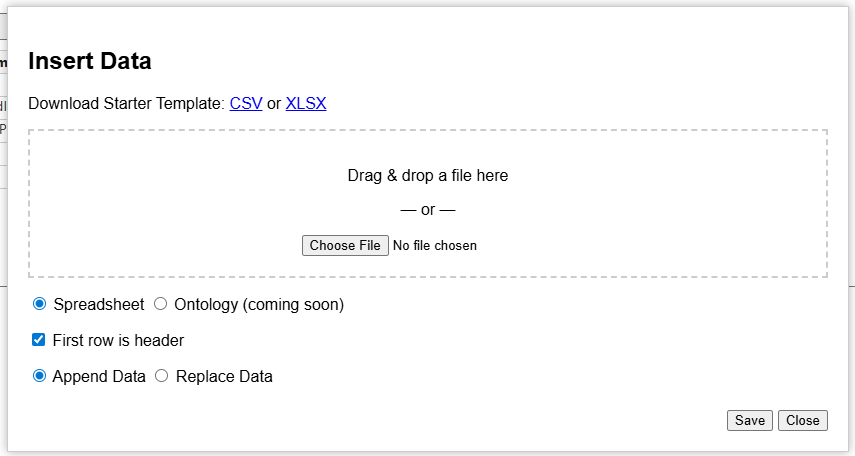
Add a spreadsheet (CSV or XLSX) easily by dragging and dropping or selecting from within a folder. You can wipe the current table and replace with the new, or you can just append it to the bottom (instead of overwriting).

Note: I recommend XLSX if you are loading more than just a bag of IRIs and labels, type statements and is-a statements, because commas in CSV can mess up the interpreter. This is especially important for definitions and citations.

(the ability to import ontology data is coming soon)

Ontology Settings

Here you can assert things like the label, creator, description, and the IRI schema. Prefer human-readable IRIs? It can generate them on the fly based on the label the ontologist gives. Prefer PascalCase, camelCase, or snake_case? Got you covered. Do you prefer opaque IRIs? Give some leading text, some digits, and some starting number, pretty similar to Protege’s capability. GUID-based IRI generator coming soon.

Generate IRIs with the “Backfill IRIs” button.

Manage IRI Prefixes

Easily add new prefixes for namespaces. Common namespaces are already included with their common prefixes.

Manage Predicates

I have 15 pre-defined commonly-used annotations in the drop down. These are used by Basic Formal Ontology, Common Core Ontologies, and Ontology of Biological and Biomedical Ontologies (OBO) Foundry. By extension, these would be helpful for folks in the Industrial Ontologies Foundry (IOF) and the emerging National Security Ontology (NSO) Foundry.

Of course, you can also add your own custom IRI. This is also where columns can be managed to show/hide.

Conclusion

I have found that this software has improved drafting ontologies while I’m working solo. One project, what would have taken me about an hour and a half, instead took me less than an hour. That’s pretty good. I think if I can get into habits using it, I would be even faster. I also think that while I’ve been using it, it has give me more ideas about what I want to do next to improve it.

I have heard some good feedback from other users, and I have added features people have requested. Some have been pretty excited. I’m always interested in more feedback, so if you are using it, let me know what you think!

A Words’ Obscurity Is Not a Defect

From Berkeley’s Alciphron,

EUPHRANOR-You seem, Alciphron, to think obscurity a defect; but if it should prove to be no defect, there would then be no force in this objection.
ALICIPHRON- I grant there would not.

EUPH.- Pray tell me, are not speech and stile instrumental to convey thoughts and notions, to beget knowledge, opinion, and assent?
ALC.-This is true.

EUPH.-And is not the perfection of an instrument to be measured by the use to which it is subservient ?
ALC.- It is.

EUPH.-What, therefore, is a defect in one instrument, may be none in another. For instance, edged tools are in general designed to cut; but the uses of an axe and a razor being different, it is no defect in an axe, that it hath not the keen edge of a razor: Nor in the razor, that it hath not the weight or strength of an axe.
ALC.-I acknowledge this to be true.

EUPH.-And may we not say in general, that every instrument is perfect which answers the purpose or intention of him who uses it?
ALC.- We may.

EUPH- Hence it seems to follow, that no man’s speech is defective in point of clearness, though it should not be intelligible to all men, if it be sufficiently so to those, who he intended, should understand it: Or though it should not in all parts be equally clear, or convey a perfect knowledge, where he intended only an imperfect hint.

Restart Wi-Fi adapter by Batch Script

If you’re like me, you have a laptop that for no known reason has the wifi turn off abruptly and won’t turn back on unless you reset it (fastest way was to just use the troubleshooter). It is a new laptop, so it shouldn’t be doing anything like this. Whatever.

I wanted to have a faster way to reset it than going into Windows troubleshooter or manually typing commands every time, so I created a batch file (.bat) that runs what the Windows troubleshooter does anyway. But it also looks like no one really posts this simple fix online, or Google’s search algo just steers users away from How-To’s on batch files unless it’s explicitly requested. So, I thought I’d just make it available, so you can create your own batch file. Maybe Google’s algo won’t direct anyone here. We’ll see. So, here’s the simple script:

echo on
netsh interface set interface Wi-Fi disable
netsh winsock reset
netsh interface set interface Wi-Fi enable

Explanation:

  1. Line 1 basically tells the command prompt to display whatever command is called, for the user, so the user knows what is going on when.
  2. Line 2 commands the network shell (netsh) to call upon a resource (interface) manipulate it (set), namely the wifi adapter (interface Wi-Fi) and change its value to OFF (disable). Your interface’s name might vary. Check by running ‘netsh interface show interface’ in a command prompt, and it’ll show you.
  3. Line 3 commands the network shell to call upon Windows Sockets API (winsock) and manipulate it to a zero state (reset)
  4. Line 4 commands the network shell to call upon a resource manipulate it, namely the wifi adapter and change its value to ON (enable)

If you got this far and you don’t know how to run it, see the warning below. But to cut to the chase: paste the code block in Notepad and save as a new file. Select “all file types” (rather than .txt files), and manually add “.bat” to the end of the file. This forces the file to be saved as a Batch File format (.bat), rather than the default for Notepad (.txt). Second, you need to run it in a Command Prompt. Third, this requires admin privileges. You can just save it on your desktop, right-click “Run as Administrator”, and you’re good.

Obligatory warning: if any of this seems totally foreign to you, google each of the things I mentioned. If any of this makes you uncomfortable, or if you have to be sneaky to get admin access, then just don’t do this. Ask someone you trust who is more competent to do it. You’d hate to turn off your wifi, not know how to turn it back on, only to not have internet access to google “how to fix the mess I’m in now”. Don’t cut off the branch you’re sitting on.

Maybe some other time I’ll post my script for resetting a printer spooler. I bet that’s online somewhere already, right?

P.S. I know I could just use Linux. That discussion is for another time. :þ

Fallacious and non-fallacious Whataboutism

In my view, many so-called ‘fallacies’ have rational counterparts. A fallacy is just a counterfeit for sound or cogent reasoning. It looks like good reasoning, but it is off in a subtle way. It is because there is a legitimate form of reasoning adjacent to the fallacy, which explains why the fallacy is so appealing.

Someone asked on Reddit “Is whataboutism always fallacious?

Here’s my reply:


Bringing up someone else’s lack of consistency across cases is not fallacious in and of itself. It’s basically an appeal to say “Show me your principles, so I can understand you” and follow-up “But are you really even relying on these principles? It appears you aren’t in this other case.” It is not fallacious only because if there is a double standard, it would best to find which standard should be applied. The rational inquiry is about what is the standard to which one ought to appeal.

Likewise, bringing up another case can highlight that the same principles are applied consistently, but there is a morally relevant difference between the two cases. The appeal to consistency, that like cases should be treated alike, can be satisfied, when one shows that the two cases are importantly dissimilar.

Bringing up someone else’s lack of consistency can be fallacious, if the effort is designed to distract, divert, or otherwise ignore the reasoning of the argument. At that point, the ‘what about’ isn’t brought up to find out either the principles or the morally-relevant differences between the two cases, but rather to gainsay the conclusion in a snarky way. In other words, it is fallacious when the charge of hypocrisy is irrelevant to the truth of the conclusion.

I’ll give a positive example:

Pro-life advocates believe that some people have special obligations to the vulnerable. Some positive rights (and positive duties) can accrue naturally. E.g., biological mothers have a unique relationship with duties to their unborn child.

But some pro-life advocates don’t think this clearly, or don’t really hold this view. They get confused or they get accused for holding a general obligations view, that we general obligations to anyone who is vulnerable. If you can help save someone’s life, then you ought to save that person’s life. If you can help stave off starvation, then you should do it.

And so critics might say what about charity work, welfare programs for poor mothers, welfare programs for children, government funding for adoption and foster care, sending government aid to other nations, etc. In other words, pro-lifers who appeal to the principle “we all, in virtue of being persons capable of saving lives, have obligations to care for any person who is in need of life-sustaining care.” Such a pro-lifer could be inconsistent in their principles, if they want to make abortion illegal but think that the government should never impose a tax to help the poor.

This is a NON-FALLACIOUS whataboutism.

Some critics say “You only care about them when they are in the womb! What about when they are born? You don’t really care about their welfare!”

This is a FALLACIOUS whataboutism.

Why? The pro-lifer thinks that the mother (and father) still have special obligations to the child after birth, unless she (they) can responsibly delegate them to another, say adoptive parents, extended family, etc.

Some critics say “You only care about the fetus’s rights. What about the mother? Doesn’t she have rights?”

This is a FALLACIOUS whataboutism.

The pro-lifer cares about the rights of the mother too. But some rights are more fundamental than others; say, my right to property is less fundamental than my right to life; likewise my right to autonomy is less fundamental than my right to life.

Some critics say, “You only care about the right to life, but what about standards of living? You seem to think you gotta keep them alive even if their life is horrible.”

This is a FALLACIOUS whataboutism.

The pro-lifer thinks that welfare is morally important. Welfare programs do not automatically get legal justification because welfare is morally important. Moreover, special obligations (individual to individual) are not the same, but grounded differently, as general obligations (individual to group, or group to individual).

The Method to Science, Book 1 now available

I have now made the entire text The Method to Science, Book I, available online! Rather than continue to make each less available piecemeal, which I can do later (it is rather tedious to reformat and tailor everything to HTML), the entire text is now available as a PDF. It can be downloaded here: https://jonathanvajda.com/the-method-to-science/

I intend to create the next layer (updating spelling, such as ‘meerly’ -> ‘merely’, ‘compleat’ -> ‘complete’) after I finish the remaining books. There is so much to say by way of commentary. Much of what he offers is a fairly clear and straightforward case for Aristotelian philosophy and Thomistic Christian metaphysics. I’ll be brief for now, but here are a few tidbits of some odd or interesting contours of the text:

  • Addresses puzzles of non-entities and negations, and our meanings of such terms if they are truly nothing
  • Argues that nature abhors a vacuum, contra the Epicureans
  • Justifies his use of the 10 Categories (of Aristotle), clarifying along the way common misunderstandings and arguing against competing views (e.g., about absolute place, relative place, etc.)
  • Distinguishes between habits and dispositions
  • Clarifies why God is said to be eternal if there is no ‘before’ the Creation of the universe
  • Explains how many angels can fit on the head of a pin (sort of), and why
  • Warns against common misunderstandings of words and getting caught up in logomachy (arguments over meanings of words)

And that’s not all!

Method to Science, Lessons 2 and 3

I have posted the two most recent lessons from Sergeant’s Method to Science. First, some editing notes, and then some philosophical insights from Lessons II and III worth mentioning.

Editing notes. I have changed some conventions a little bit. First off, I am including both Sergeant’s marginal notes and mine in-text with a set-bracket, e.g. “{Sect. 7.}” and “{Latin: ‘secondary substance’}”, respectively. I use these because the normal brackets “[ ]” are used by Sergeant extensively to clarify his own speech or highlight a technical term, so I want to preserve a distinction between Sergeant’s voice and my own, to an extent that is more obvious to the reader. Yet one might worry but you’re still using brackets for your voice and his! To which I respond, yes, but that in my editing software it is more obvious, and this is what I consider canonical in my project. Second, when Sergeant uses margin notes he is fairly consistent in using them to refer to other passages in his same work, and thus when he does so I provide a link to that referent, if the page exists.

This brings me to the other new addition (thus far often frustrated by WordPress’s UI), that now every section has an anchor to which one may provide a direct link. E.g., to go to Lesson 2, Section 16, Note 2 -> the URL is currently “https://jonathanvajda.com/lesson-ii-of-the-distinction-of-natural-notions/#2.16note2“. I hope in the near future to make it easy to cite sections with a citation generator. I am currently intending a citation scheme like those for Locke and Hume to refer to a text, book number, chapter number, section number. E.g., “Essay IV.i.2.”

Philosophical comments. Lesson II highlights his Aristotelian system in adopting the 10 categories famously presented in Aristotle’s De Interpretatione. He defends his use and gives examples. One such example Sergeant offers is a sentence that contains predication from every category. “Peter1, tho’ but a yard2 and half high, yet a Valiant3 Subject4, fought5 and was wounded6 yesterday7, in8 the Field, standing9 upon his guard, armed10.” Not all philosophers in this period (or prior eras) have this pedagogical flair.

Later in Lesson II, he gives an argument against Ideism, the view that we have ideas in our intellect that stand for the objects outside the intellect, by which we know those objects, though ideas are fundamentally different from the objects themselves. While he affirms the axiom ‘Whatever is received is received according to the manner of the receiver’ (Latin: “Quicquid recipitur, recipitur ad modum recipientis“), he raises the objection that the new Ideists are misapplying this axiom in a way that produces skepticism. He emphasizes that when we speak of these ten categories of predicates, they are not properly just ideas in the mind nor just the excitations of motions unlike the objects. Instead, what Ideists call an idea is much more like a “corporeal resemblance” (“phantasm”), which does not involve the definition or nature of the object so depicted. He worries that Ideists are collapsing the meaningful distinction between two different mental contents about objects of sense, say, of a tree, the definition of a tree vs the picture of a tree.

In Lesson III, Sergeant offers a rich exposition on individuality and essences. Not only does he give conditions for continued existence, he defines a thing (Ens) is something which is capable to exist, whereas something common (Man, Horse, Tree, etc.) are incapable to exist. He admits that there are essential differences among individual humans, and not just accidental differences. These offer a preview of a major point to be made in Sergeant’s work, insofar as having an answer to the problem of universals and of individuation.

However in this same passage there is a complicated and potentially unfortunate discussion of what it means to be a human. First, he is sticking to the traditional definition of rational animal, but he also talks about how some individuals are more human than others in that they have greater or lesser rationality, greater and lesser ability to respond in myriad ways to sensation, etc. Perhaps more work needs to be done to avoid the worry that some individuals who fit the definition rational animal might not have the same moral status.

Lastly, in Lesson III, Sergeant attempts to resolve a problem concerning substance dualism. He affirms that we have a corporeal nature and a spiritual nature; does this mean that we are two beings, and not just one? In his response he offers that we are not both body and spirit formally. Instead, a human is “formally a body, tho’ his Soul be of a spiritual Nature, which makes him virtually a Spirit.” This formal vs virtual distinction is curious, in that in modern terms this sounds like his account tends toward Functionalism. I need, of course, to read this more fully how the virtual distinction doesn’t commit himself to such.

Works of John Sergeant, electronic

I began a project in my spare time of editing and cleaning up extant electronic versions of the works of the early modern philosopher and theologian, John Sergeant (1623-1707). The most famous and most easily available are his Method to Science (1696), Solid Philosophy (1697), and Transnatural Philosophy (1700).

You can go to the “John Sergeant” link in the menu to see what chapters and sections are available thus far.

One of my concerns has been to perform this project with the rigor of text criticism in mind. First it means that any changes I make, I document them or have some other way to verify that I made a change. Second that texts are available as they were printed. This means that archaic and irregular spellings are preserved (e.g., “compleat” instead of “complete”, “metaphysicks” instead of “metaphysics”, etc.). Third, it means that if and when I make an official, complete edited version, I can justify every revision or textual variant I am introducing into the stream of textual transmission.

I may post every now and then when I reach important milestones.

Phase 10 Score Tracking Spreadsheet

Want to keep track of scores Phase 10 but don’t want to use paper? There really wasn’t any easy way to do it electronically. I can’t think of an app that would do this well. Here’s what I would want the score keeper to be able to do:

  • enter in numbers and the total score is calculated automatically
  • keep track of who has completed a phase in a round
  • easily calculate which phase each player is on

Well, could a spreadsheet do that? Yes! Yes it can!

Here’s mine:

And here’s the template version: https://docs.google.com/spreadsheets/d/1PzaZWrFHKojBDYrMMDB-5gSQEs9ORg65Jt4MMbVfI2M/copy?copyComments=false

It accomplishes all of the intended tasks. Phases completed are shown by checking a box, and at the bottom is a tally of how many boxes are checked. Pretty straightforward. But it also gives a round amount you can enter, and the running total automatically displays on the right.

How can you use it? You’d probably want to download/copy the file. It’s a google sheet. Enter your own players and scores under the player’s names.

If you use it and like it, please let me know! If you found mistakes or ways to improve, let me know! If you want to distribute it (or modify and distribute), please credit me.